RAG & Vector Search
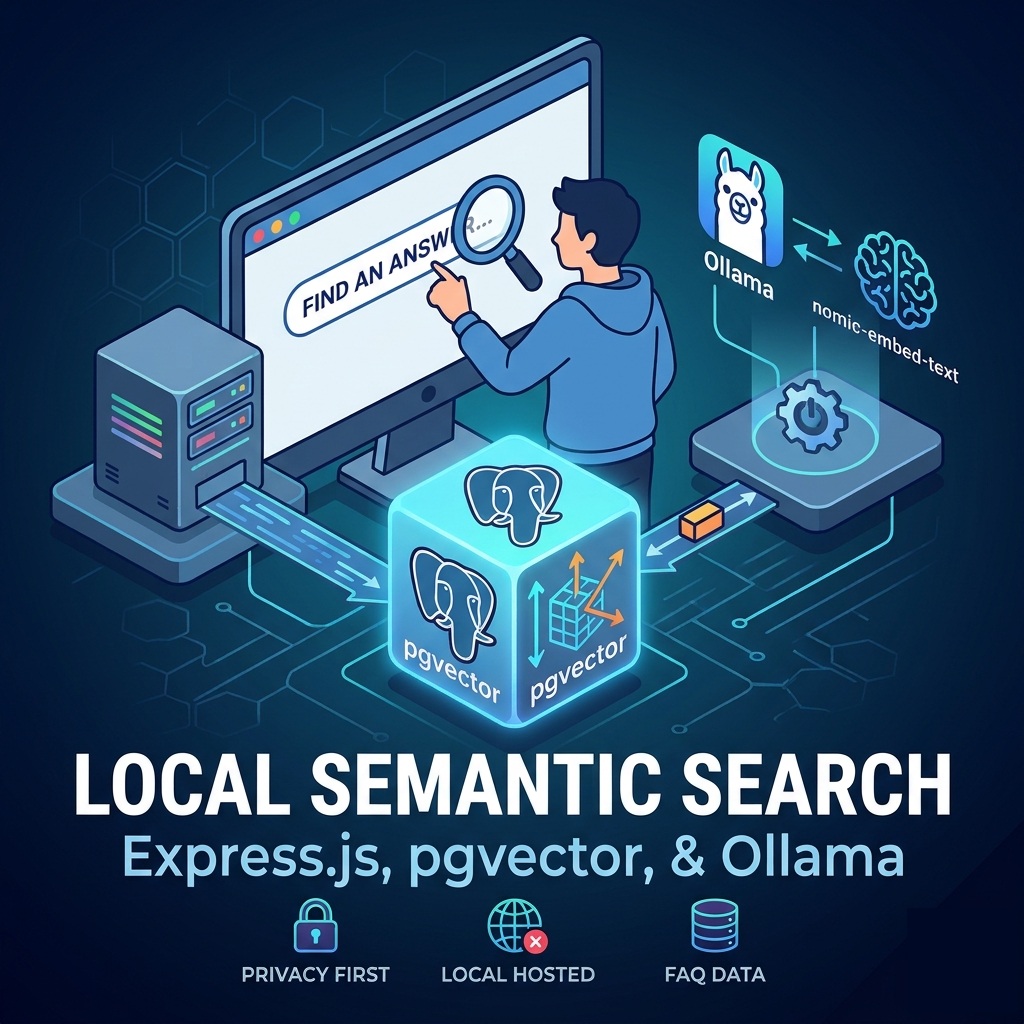
Let's Start with Vector Database
We will do this by creating a PostgreSQL database inside a Docker container. Beware: I am not going to put too much emphasis on security here. The following steps will only show you how to get Docker up and running quickly.
If you have Docker Desktop installed, open your terminal and run:
docker run --name my-postgres -e POSTGRES_PASSWORD=mysecretpassword -p 5430:5432 -d --rm pgvector/pgvector:pg18-trixieNote: If you already have Postgres installed locally, use a different port internally instead of the default 5432. I used 5430.
Next, we need to include the pgvector extension on top of PostgreSQL. Once we run the command above, Docker will pull the image and start running it for you.
Now, let's run the docker exec command to log into our database using the postgres user created by default when launching a PostgreSQL container:
docker exec -it -u postgres my-postgres psqlCreate a database
CREATE DATABASE faq_messages;

-- Connect to the new created database
\c faq_messages

-- Create a table
CREATE TABLE faq_content (
  content_id INTEGER PRIMARY KEY GENERATED ALWAYS AS IDENTITY,
  content JSONB NOT NULL
);

-- Populate the table with sample data
INSERT INTO faq_content (content)
VALUES
('{
      "type": "General & Access",
      "question": "Where can I find the full company employee handbook and policy manual?",
      "answer": "The complete handbook is available on the internal company intranet / HR portal. Hard copies can also be requested directly from the HR department."
  }'),
  ('{
      "type": "General & Access",
      "question": "Who do I contact if I have questions about a specific policy?",
      "answer": "You can reach out to your direct manager for day-to-day application questions or email the HR team at `hr@nestedreality.com` for formal interpretations."
  }'),
  ('{
      "type": "Time Off, Leave & Attendance",
      "question": "How do I request vacation or paid time off (PTO)?",
      "answer": "Submit your request at least two weeks in advance through the HR/payroll software system. Your manager must approve it before you finalize travel plans."
  }'),
  ('{
      "type": "Time Off, Leave & Attendance",
      "question": "What is the procedure if I am sick or running late?",
      "answer": "Notify your direct manager and HR via phone or Slack/teams message at least 1 hour before your scheduled start time."
  }'),
  ('{
      "type": "Time Off, Leave & Attendance",
      "question": "Do we get paid for statutory/public holidays?",
      "answer": "Yes, all full-time employees receive paid time off for recognized company and statutory holidays. (See our _Paid Holidays Policy_ for details on weekend shifts or premium pay)."
  }'),
  ('{
      "type": "Compensation & Pay",
      "question": "When is payday?",
      "answer": "Employees are paid bi-weekly on Friday covering the previous two-week pay period."
  }'),
  ('{
      "type": "Compensation & Pay",
      "question": "What is the difference between exempt and non-exempt employees?",
      "answer": "on-exempt employees are eligible for overtime pay (1.5x regular rate for hours worked over 44 per week or local standards), whereas exempt employees receive a set salary not tied to hours worked."
  }'),
  ('{
      "type": "Compensation & Pay",
      "question": "How do I report work-related travel expenses?",
      "answer": "Submit itemized receipts through the expense portal within 14 days of the trip. Mileage is reimbursed at the current corporate or statutory rate (e.g., $0.48/km)."
  }'),
  ('{
      "type": "Workplace Conduct & Remote Work",
      "question": "What is the company’s policy on remote or hybrid work?",
      "answer": "Core hours are from 9:00 AM – 5:00 PM EST, during which you should be accessible online. Specific days in-office depend on your department’s hybrid schedule."
  }'),
  ('{
      "type": "Workplace Conduct & Remote Work",
      "question": "What should I do if I witness or experience harassment or discrimination?",
      "answer": "Report it immediately to HR, your manager, or use our anonymous reporting hotline. Retaliation against anyone who reports an incident in good faith is strictly prohibited."
  }'),
  ('{
      "type": "Workplace Conduct & Remote Work",
      "question": "Can I use generative AI tools (like Claude, ChatGPT, or Gemini) for my daily tasks?",
      "answer": "Use of AI tools is permitted only under our _AI Use Policy_—never input confidential company data, client information, or proprietary source code into public AI models."
  }');


---- You can query just the questions
select content['question'] from faq_content;

-- Or add a condition
select content['question'] from faq_content where content->> 'type' = 'General & Access';
FULL TEXT SEARCH in POSTGRESQL
-- Search for the word 'pay' in the content object
SELECT content from faq_content
WHERE to_tsvector('english', content) @@ to_tsquery('english', 'Pay');

-- Search for the word 'pay' in the answer object property only
 SELECT content from faq_content
 WHERE to_tsvector('english', content->'answer') @@ to_tsquery('english', 'Pay');

-- Search for the word 'AI' in the question column
 SELECT content from faq_content
 WHERE to_tsvector('english', content->'question') @@ to_tsquery('english', 'AI');


-- Search for 'pay' and 'holiday' keywords
SELECT content from faq_content
WHERE to_tsvector('english', content) @@ to_tsquery('english', 'Pay & holiday');

-- Search for the keyword 'remote' or 'travel'
 SELECT content from faq_content
 WHERE to_tsvector('english', content) @@ to_tsquery('english', 'remote | travel');
- to_tsvector converts text into a searchable vector of lexemes (normalized words)
- to_tsquery converts your search term into a query
- @@ is the "matches" operator
Let's Connect to the Database Using an Interface
You should have Node.js installed and set up already to complete this step.
# Open a terminal and create a directory for the project
mkdir rag_project && cd rag_project

npm init -y

# Go to package.json and change type to "module" if it is currently using "commonjs":
"type": "module"


# Install the packages express and pg
npm install express@5.2.1 pg@8.20.0

# Make a static directory
mkdir static

# Create the index and server files
touch static/index.html server.js

# Open in your editor and copy the code into these two files (I am going to use VS Code)
code .
Create a UI (index.html)
<!doctype html>
<html lang="en">
  <head>
    <meta charset="UTF-8" />
    <meta name="viewport" content="width=device-width, initial-scale=1.0" />
    <title>RAG PROJECT USING POSTGRESQL & PGVECTOR</title>
  </head>
  <body>
    <input type="text" placeholder="Keyword" id="search" />
    <button id="btn">Search</button>
    <pre>
        <code id="code"></code>
    </pre>

    <script>
      const btn = document.getElementById('btn')
      const code = document.getElementById('code')
      const search = document.getElementById('search')

      btn.addEventListener('click', async () => {
        code.innerText = 'loading'

        const res = await fetch(
          '/get?search=' + encodeURIComponent(search.value),
        )
        const json = await res.json()

        code.innerText = '\n' + JSON.stringify(json, null, 4)
      })
    </script>
  </body>
</html>
Create a the connection (server.js)
import express from 'express'
import { Pool } from 'pg'
const pool = new Pool({
  connectionString:
    'postgresql://postgres:mysecretpassword@localhost:5430/faq_messages',
})

async function init() {
  const app = express()

  app.get('/get', async (req, res) => {
    const client = await pool.connect()
    const [questionRes, answerRes] = await Promise.all([
      client.query(
        " SELECT content from faq_content WHERE to_tsvector('english', content->'question') @@ to_tsquery('english', $1)",
        [req.query.search],
      ),
      client.query(
        " SELECT content from faq_content WHERE to_tsvector('english', content->'answer') @@ to_tsquery('english', $1)",
        [req.query.search],
      ),
    ])
    res
      .json({
        status: 'ok',
        questions: questionRes.rows[0] || {},
        answers: answerRes.rows,
      })
      .end()
    client.release() // keep the connection warm. I don't want terminate it yet
  })

  const PORT = process.env.PORT || 3000
  app.use(express.static('./static'))
  app.listen(PORT)

  console.log(`running on http://localhost:${PORT}`)
}
init()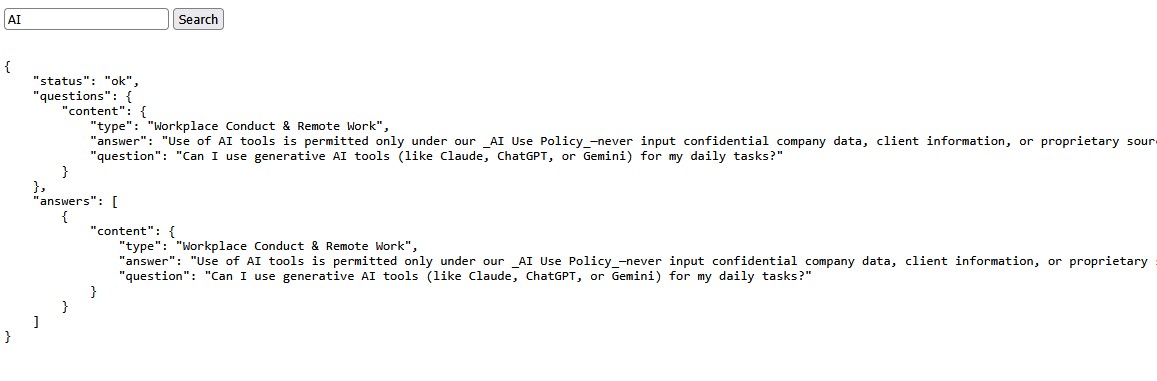
Let's Run the App
node --watch server.js

# Enter a keyword to search the database.
# It will search in both the question and answer object properties.
RAG (retrieval augmented generation)
Now that we have a database, let's feed our data (context) to an embedding LLM. (I am going to use an open model, but you can use whatever you want, including Anthropic, OpenAI, or Google). The process works by taking our data and converting it into a vector, which links semantically related words together and returns a large vector array. We then store that array in our vector database. Later, it measures the vector distance between our query keywords using the specialized pgvector extension.
Instead of browsing the internet for search results, we feed the LLM a restricted set of data and search solely within our provided context. You might wonder: why use an LLM if you can do this with any database? The reason is that our queries can be written in natural human language; the LLM interprets our meaning and reformats the query into a syntax the database can understand.
I am going to build this using Ollama and the nomic-embed-text embedding model.
Once you install Ollama, run the following to pull the model:
ollama pull nomic-embed-text

# you can run the following if you want to see what it looks like
curl http://localhost:11434/api/embed \
  -d '{
    "model": "nomic-embed-text",
    "input": "When do we get paid?"
  }'

# you can also do this with open AI, you need to put your API key which is not free, but it won't cost that much
curl https://api.openai.com/v1/embeddings \
  -H "Authorization: Bearer $OPENAI_API_KEY" \
  -H "Content-Type: application/json" \
  -d '{
    "input": "When do we get paid?",
    "model": "text-embedding-3-small"
  }'
Important Note: You cannot mix and match models. If your database content is vectorized with one embedding model, you must use that exact same model to convert queries when searching your database.
embed.js
import pg from 'pg'

const CONNECTION_STRING =
  'postgresql://postgres:mysecretpassword@localhost:5430/faq_messages'

const PROVIDERS = {
  ollama: {
    dimensions: 768,
    model: 'nomic-embed-text',
    async embed(texts) {
      const res = await fetch('http://localhost:11434/api/embed', {
        method: 'POST',
        headers: { 'Content-Type': 'application/json' },
        body: JSON.stringify({
          model: 'nomic-embed-text',
          input: texts,
        }),
      })

      if (!res.ok) {
        const err = await res.text()
        throw new Error(`Ollama API error: ${res.status} ${err}`)
      }

      const data = await res.json()
      return data.embeddings
    },
  },
}

const [mode, providerName, ...rest] = process.argv.slice(2)

if (!PROVIDERS[providerName] || !['generate', 'get'].includes(mode)) {
  console.error('Usage:')
  console.error('  node embed.js generate ollama    Embed all faq_content')
  console.error('  node embed.js get ollama "text"    Get a single embedding')
  process.exit(1)
}

const provider = PROVIDERS[providerName]

if (mode === 'get') {
  const text = rest.join(' ')
  if (!text) {
    console.error(
      'Provide text to embed: node embed.js get ollama "your text here"',
    )
    process.exit(1)
  }

  const [embedding] = await provider.embed([text])
  console.log(`[${embedding.join(',')}]`)
} else {
  console.log(
    `Using ${providerName} (${provider.model}, ${provider.dimensions} dimensions)`,
  )

  const client = new pg.Client({ connectionString: CONNECTION_STRING })
  await client.connect()

  await client.query('CREATE EXTENSION IF NOT EXISTS vector')

  // Drop and recreate the column to match provider dimensions and column name 'embeded'
  await client.query(`
    DO $$
    BEGIN
      IF EXISTS (
        SELECT 1 FROM information_schema.columns
        WHERE table_name = 'faq_content' AND column_name = 'embeded'
      ) THEN
        ALTER TABLE faq_content DROP COLUMN embeded;
      END IF;
    END $$
  `)
  await client.query(
    `ALTER TABLE faq_content ADD COLUMN embeded vector(${provider.dimensions})`,
  )

  const { rows } = await client.query(
    'SELECT content_id, content FROM faq_content ORDER BY content_id',
  )
  console.log(`Found ${rows.length} faq_content rows to embed`)

  const BATCH_SIZE = 50
  for (let i = 0; i < rows.length; i += BATCH_SIZE) {
    const batch = rows.slice(i, i + BATCH_SIZE)

    // Convert JSONB object into a readable text string for embedding
    const texts = batch.map((r) => {
      const c = r.content || {}
      return `Type: ${c.type || ''}\nQuestion: ${c.question || ''}\nAnswer: ${c.answer || ''}`
    })

    const embeddings = await provider.embed(texts)

    for (let j = 0; j < batch.length; j++) {
      const vectorStr = `[${embeddings[j].join(',')}]`
      await client.query(
        'UPDATE faq_content SET embeded = $1 WHERE content_id = $2',
        [vectorStr, batch[j].content_id],
      )
    }

    console.log(
      `Embedded ${Math.min(i + BATCH_SIZE, rows.length)}/${rows.length}`,
    )
  }

  console.log('Done!')
  await client.end()
}
Add the following scripts to your package.json:
"scripts": {
  "embed:ollama": "node embed.js generate ollama",
  "get:ollama": "node embed.js get ollama"
},
-- You can verify if it was successful
select embeded from faq_content limit 1;Now let's search our vector database using whatever query we want. But before we do, our query must pass through the embedding model to be converted as well.
npm run get:ollama "when are we getting paid?"

# We can copy and paste the generated vector into our SQL syntax:
SELECT
  content,
  embeded <=> '[<your vectors>]' AS distance
FROM faq_content
ORDER BY distance
LIMIT 15;

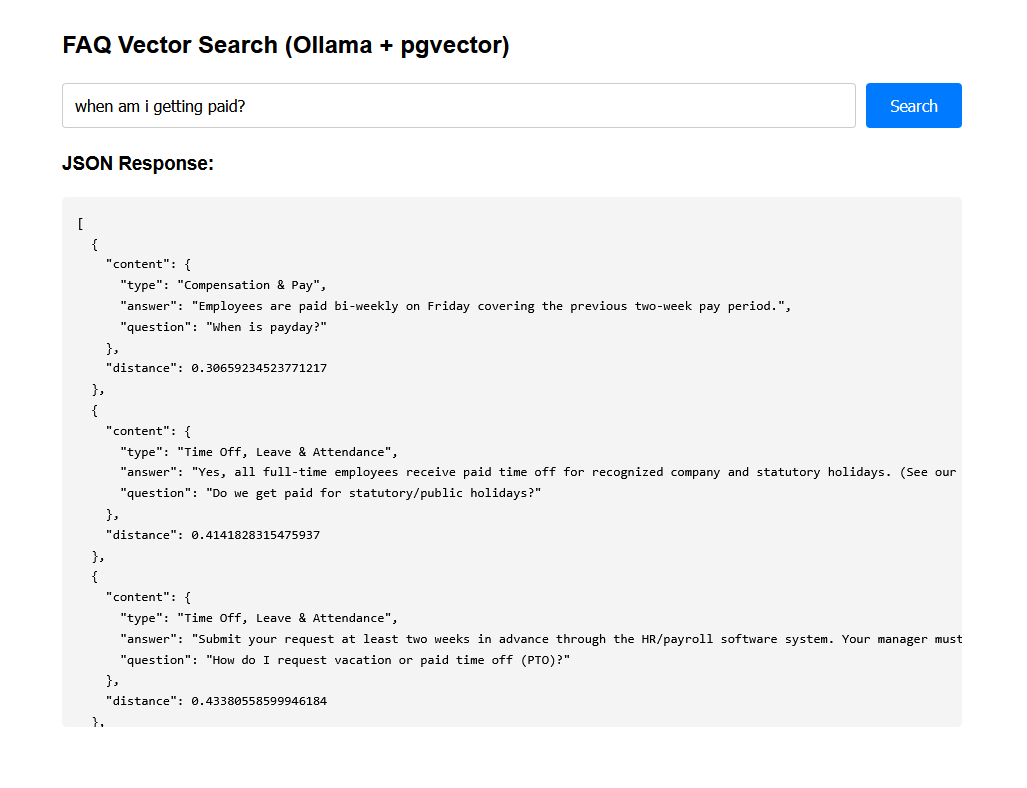
Let's Create an Interface Instead of Using the Terminal
rag_server.js
import express from 'express'
import pg from 'pg'

const app = express()
const PORT = 3000

const CONNECTION_STRING =
  'postgresql://postgres:mysecretpassword@localhost:5430/faq_messages'
const pool = new pg.Pool({ connectionString: CONNECTION_STRING })

app.use(express.json())
app.use(express.urlencoded({ extended: true }))

// Helper function to get vector embedding from local Ollama instance
async function getOllamaEmbedding(text) {
  const res = await fetch('http://localhost:11434/api/embed', {
    method: 'POST',
    headers: { 'Content-Type': 'application/json' },
    body: JSON.stringify({
      model: 'nomic-embed-text',
      input: [text],
    }),
  })

  if (!res.ok) {
    const err = await res.text()
    throw new Error(`Ollama API error: ${res.status} ${err}`)
  }

  const data = await res.json()
  return data.embeddings[0] // returns the array vector
}

// Serve a simple HTML frontend with an input field
app.get('/', (req, res) => {
  res.send(`
    <!DOCTYPE html>
    <html>
    <head>
      <title>FAQ Vector Semantic Search</title>
      <style>
        body { font-family: Arial, sans-serif; max-width: 900px; margin: 40px auto; padding: 0 20px; line-height: 1.6; }
        .search-box { display: flex; gap: 10px; margin-bottom: 20px; }
        input[type="text"] { flex: 1; padding: 12px; font-size: 16px; border: 1px solid #ccc; border-radius: 4px; }
        button { padding: 12px 24px; font-size: 16px; background-color: #007bff; color: white; border: none; border-radius: 4px; cursor: pointer; }
        button:hover { background-color: #0056b3; }
        pre { background: #f4f4f4; padding: 15px; border-radius: 5px; overflow-x: auto; max-height: 500px; }
      </style>
    </head>
    <body>
      <h2>FAQ Vector Search (Ollama + pgvector)</h2>
      <div class="search-box">
        <input type="text" id="questionInput" placeholder="Enter your question here..." />
        <button onclick="performSearch()">Search</button>
      </div>
      <h3>JSON Response:</h3>
      <pre id="resultContainer">Enter a question above and click Search...</pre>

      <script>
        async function performSearch() {
          const question = document.getElementById('questionInput').value;
          const container = document.getElementById('resultContainer');

          if (!question.trim()) {
            alert('Please enter a question');
            return;
          }

          container.textContent = 'Generating vector and querying database...';

          try {
            const response = await fetch('/search', {
              method: 'POST',
              headers: { 'Content-Type': 'application/json' },
              body: JSON.stringify({ question })
            });
            const data = await response.json();
            container.textContent = JSON.stringify(data, null, 2);
          } catch (err) {
            container.textContent = 'Error: ' + err.message;
          }
        }
      </script>
    </body>
    </html>
  `)
})

// Search API endpoint
app.post('/search', async (req, res) => {
  try {
    const { question } = req.body
    if (!question) {
      return res.status(400).json({ error: 'Question is required' })
    }

    // 1. Convert user input question to a vector array using Ollama
    const embeddingArray = await getOllamaEmbedding(question)
    const vectorStr = `[${embeddingArray.join(',')}]`

    // 2. Execute SQL query with pgvector cosine distance operator (<=>)
    const sqlQuery = `
      SELECT
        content,
        embeded <=> $1 AS distance
      FROM faq_content
      ORDER BY distance
      LIMIT 15;
    `

    const { rows } = await pool.query(sqlQuery, [vectorStr])

    // 3. Return content and distance as JSON
    res.json(rows)
  } catch (err) {
    console.error(err)
    res.status(500).json({ error: err.message })
  }
})

app.listen(PORT, () => {
  console.log(`Server running at http://localhost:${PORT}`)
})
The next installment will cover using files instead of a database and communicating with them through a chatbot interface. I will post a link here once it is finished!